
Many foreigners in Korea experience the same frustrating problem.
You already have a Korean phone number.
You can receive text messages.
Your SIM card works.
Your mobile data works.
But when you try to sign up for a Korean app, open a banking app, use PASS, or verify your identity online, the system says verification failed.
This happens because Korean phone verification is not always just about receiving an SMS code. In many cases, Korean websites check whether your phone number, legal name, date of birth, carrier, and identity record match correctly.
If you are still setting up your phone number, start with this guide first: How to Get a Korean Phone Number as a Foreigner in 2026.
Quick Answer
Korean phone verification usually fails for foreigners because the phone number is not registered in the right way for identity verification.
The most common reasons are simple.
Your SIM card is data-only.
Your number is not under your own legal name.
Your name is entered differently from your Residence Card or passport.
You selected the wrong mobile carrier.
You are using a prepaid SIM that does not support full identity verification.
You are using a budget carrier but selected SKT, KT, or LG U+ incorrectly.
Your Residence Card information has not been updated in the carrier system.
Your PASS app is not connected to the correct carrier.
In Korea, phone verification works best when your mobile number is registered under your own legal name and matches your Korean identity record.
Why Korean Phone Verification Is Different
In many countries, phone verification simply means this:
Enter phone number.
Receive SMS code.
Type the code.
Done.
In Korea, it can be more complicated.
Korean online services often use phone verification as a form of identity verification. This means the system may check more than your phone number. It may also compare your name, date of birth, gender, nationality, carrier, and registered ID information.
That is why a foreigner can receive SMS messages normally but still fail verification.
The phone number works as a phone number, but it may not work as a verified identity tool.
Phone Number vs Identity Verification
This is the most important difference.
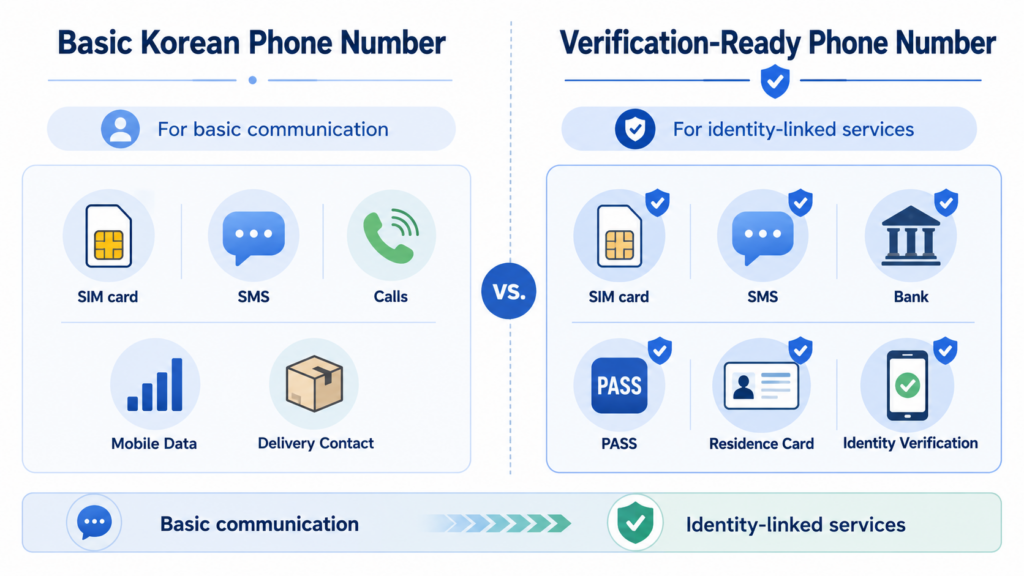
A Korean phone number is not always the same as a Korean identity-verification-ready phone number.
A regular Korean phone number can be used for basic contact
A basic Korean phone number may allow you to receive calls, receive SMS, use mobile data, talk to delivery drivers, sign up for simple services, and use messaging apps.
This is usually enough for travelers or short-term visitors.
A verification-ready phone number can be used for identity checks
A verification-ready number is more useful for banking apps, PASS, government services, shopping platforms, age-restricted services, mobile certificates, Korean financial services, and some delivery or reservation apps.
This type of number usually needs to be registered under your own legal name.
Common Error Situation Foreigners Face
Foreigners usually notice this problem when they try to use services like Coupang, Naver, Kakao, Korean banking apps, PASS, mobile payment apps, delivery apps, government websites, online shopping websites, ticket booking platforms, or age verification pages.
For example, you may see a verification screen asking for your name, date of birth, gender, nationality, mobile carrier, phone number, and SMS code or PASS authentication.
You enter everything correctly, but the system still rejects it.
The problem is usually not one big mistake. It is often a small mismatch between systems.
Reason 01) Your SIM Card Is Data-Only
Some eSIMs and travel SIMs are data-only. They are great for internet access, but they may not include a Korean phone number.
If your plan is data-only, you cannot complete Korean phone verification because there is no local mobile number connected to your identity.
How to check
Look at your SIM or eSIM plan details.
Check whether it includes voice calls, SMS, a Korean phone number, and identity verification support.
If the plan only says data, internet, unlimited data, or eSIM data plan, it may not support phone verification.
How to fix it
Use a SIM plan that includes a Korean phone number.
If you need banking, PASS, or official services, ask the provider directly:
Can this number be used for Korean mobile identity verification?
In Korean:
이 번호로 휴대폰 본인확인이 가능한가요?
Reason 02) Your Number Is Not Registered Under Your Own Name
This is one of the biggest reasons phone verification fails.
In Korea, many identity checks require your phone number to be registered under your own legal name.
If the number is registered under another person, a school, a company, a temporary provider, or a travel SIM system, it may not match your identity.
Common examples
You are using a SIM card bought by your friend.
Your company gave you a phone number under a corporate account.
Your school helped you get a temporary SIM.
You bought a tourist SIM at the airport.
You are using a prepaid SIM registered only with passport information.
Your number is active, but not connected to your Residence Card record.
How to fix it
Visit your mobile carrier or SIM provider and ask whether the number is registered under your personal legal name.
Use this Korean sentence:
제 휴대폰 번호가 제 본인 명의로 등록되어 있는지 확인하고 싶습니다.
Meaning:
I would like to check whether my phone number is registered under my own name.
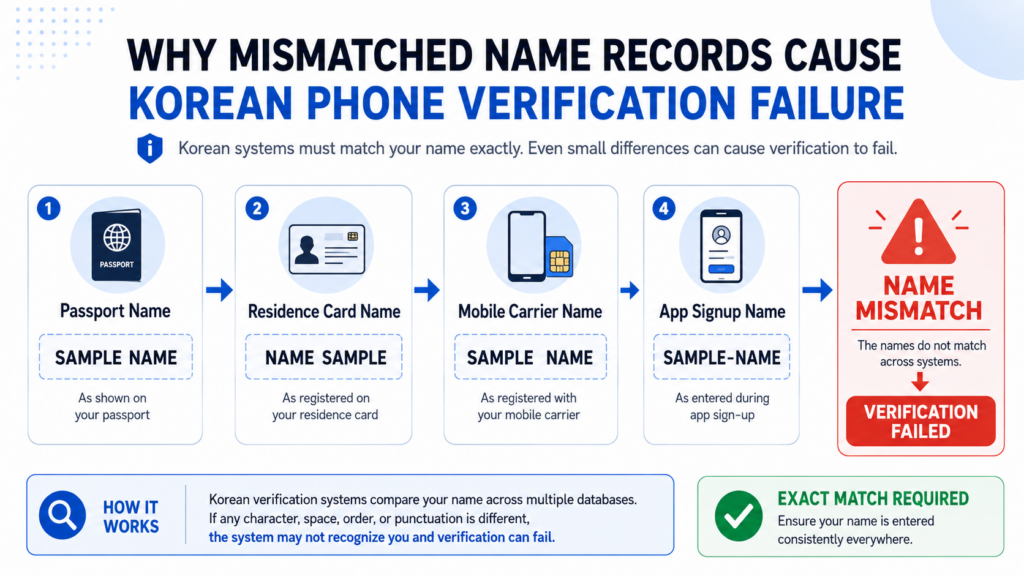
Reason 03) Your Name Does Not Match Exactly
Foreign names often create problems in Korean verification systems.
Your name may appear differently across your passport, Residence Card, bank account, phone carrier, and app signup form.
For example:
JOHN MICHAEL SMITH
SMITH JOHN MICHAEL
JOHN SMITH
JOHN M SMITH
John Michael Smith
SMITH JOHN MICHAEL
To a human, these may look similar.
To a verification system, they may be different.
Why this matters
Korean phone verification often compares your name with the name registered by your mobile carrier.
If the name you type does not match the carrier record, verification can fail.
How to fix it
Ask your mobile carrier to show exactly how your name is registered.
Use this Korean sentence:
제 이름이 통신사 시스템에 어떻게 등록되어 있는지 정확히 확인해 주실 수 있나요?
Meaning:
Can you check exactly how my name is registered in the carrier system?
Then try entering your name exactly the same way during verification.
Reason 04) You Selected the Wrong Mobile Carrier
Korean verification screens usually ask you to choose your mobile carrier.
You may see options like SKT, KT, LG U+, SKT 알뜰폰, KT 알뜰폰, LG U+ 알뜰폰.
This can be confusing because many budget mobile plans use the network of a major carrier.
For example, your plan may use the KT network, but your provider is actually a KT MVNO. In that case, selecting KT instead of KT 알뜰폰 may fail.
How to check your carrier
Check your SIM provider name.
Check your monthly bill or app.
Ask customer support which verification option you should select.
Look for MVNO, budget phone, or 알뜰폰 information.
How to fix it
During verification, choose the exact carrier category.
If you use a budget mobile plan, look carefully for 알뜰폰 or MVNO options.
If you are not sure, contact your provider and ask:
본인인증할 때 통신사를 무엇으로 선택해야 하나요?
Meaning:
Which carrier should I select during identity verification?
Reason 05) Your Prepaid SIM Does Not Support Full Verification
A prepaid SIM can be useful for foreigners, especially before receiving a Residence Card. But not every prepaid SIM supports full Korean identity verification.
Some prepaid SIMs can receive SMS.
Some can make calls.
Some can be registered with a passport.
But not all of them work with PASS, banking apps, or official identity checks.
Why prepaid SIMs can be limited
Prepaid SIM registration may not always connect to the same identity verification systems used by Korean banks and major platforms.
This depends on the provider, registration method, visa status, and whether your Residence Card information is connected.
How to fix it
Before buying or extending a prepaid SIM, ask:
Can this prepaid SIM be used for PASS and mobile identity verification?
In Korean:
이 선불 유심으로 PASS와 휴대폰 본인확인이 가능한가요?
If the answer is unclear, do not rely on that plan for banking or important accounts.
Reason 06) Your PASS App Is Not Set Up Correctly
PASS is one of Korea’s most commonly used mobile identity verification apps.
But PASS is not one single universal app. It depends on your carrier.
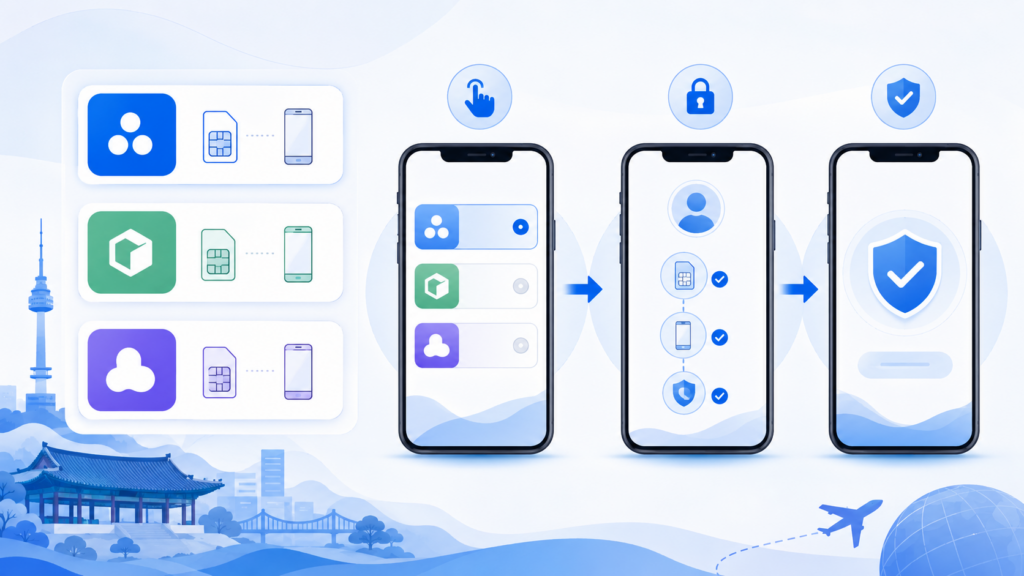
There are different PASS apps for SKT, KT, and LG U+.
If you use the wrong PASS app, or if your carrier registration is not correct, verification may fail.
What PASS can do
PASS can be used for mobile identity verification, PASS certificate, authentication history, mobile ID-related services, and some finance or government-related authentication.
But the app only works properly when your phone number and identity information are registered correctly.
How to fix it
Check these points:
Are you using the PASS app for your actual carrier?
Is your phone number under your own name?
Is your name registered correctly?
Does your plan support mobile identity verification?
Are notifications turned on?
Are you using the correct verification method, SMS or PASS app?
If you are using KT, install PASS by KT.
If you are using SKT, install PASS by SKT.
If you are using LG U+, install PASS by U+.
Reason 07) Your Residence Card Information Is Not Connected Yet
Long-term foreign residents usually need a Residence Card for stable identity verification in Korea.
But even after receiving your Residence Card, verification may still fail if your mobile carrier has not updated your information correctly.
Common situations
You opened a phone number before receiving your Residence Card.
You used your passport first, then later received your Residence Card.
You changed visa status.
You changed your name format.
You renewed or reissued your Residence Card.
You moved to a new carrier but old information remained.
How to fix it
Visit or contact your mobile carrier and ask them to update your identity information using your Residence Card.
Use this Korean sentence:
외국인등록증 정보로 휴대폰 본인확인 정보 업데이트가 가능한가요?
Meaning:
Can you update my phone verification information using my Residence Card?
Reason 08) Your Birth Date or Gender Code Is Entered Incorrectly
Some Korean verification forms ask for a birth date and gender-related information.
Foreigners may get confused because the format is different from what they are used to.
Depending on the service, the form may ask for full date of birth, six-digit birth date, gender, foreigner status, first digit after registration number, or nationality.
How to fix it
Enter your birth date exactly as requested.
If the form asks for YYMMDD, use six digits.
For example:
1998년 3월 5일
→ 980305
If the form asks for YYYYMMDD, use eight digits.
For example:
1998년 3월 5일
→ 19980305
Also check whether you selected foreigner instead of Korean citizen if the option exists.
Reason 09) You Changed Carriers or Phone Plans Recently
Verification can fail after changing your carrier, switching to an MVNO, or moving from prepaid to postpaid.
Sometimes the new carrier information does not update immediately across verification systems.
How to fix it
Wait and try again later.
Restart your phone.
Reinstall the correct PASS app.
Check whether your old PASS app is still linked to your previous carrier.
Ask your new carrier whether mobile identity verification is active.
Use this Korean sentence:
최근 통신사를 변경했는데 휴대폰 본인확인이 안 됩니다. 본인확인 서비스가 정상 등록되어 있는지 확인 부탁드립니다.
Meaning:
I recently changed carriers and mobile identity verification is not working. Please check whether the identity verification service is properly registered.
Step-by-Step Fix for Korean Phone Verification
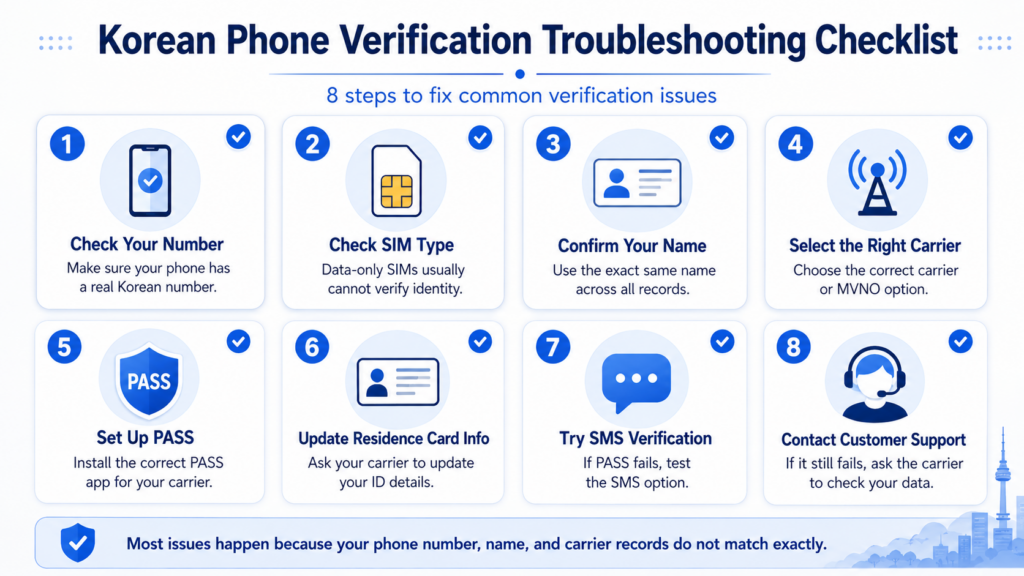
Step 01) Check whether your SIM has a real Korean phone number
First, check whether your plan includes calls and SMS.
If it is data-only, it will not work for most phone verification systems.
Step 02) Check whether the number is under your own name
Your phone number should be registered under your legal name.
If it is under someone else’s name, it may work for calls but not for verification.
Step 03) Confirm your exact registered name
Ask your carrier how your name is registered.
Then enter your name exactly the same way on the verification page.
Step 04) Select the correct carrier
If you use a budget phone plan, choose the correct 알뜰폰 or MVNO option.
Do not automatically choose SKT, KT, or LG U+ just because your plan uses their network.
Step 05) Install the correct PASS app
Install the PASS app that matches your mobile carrier.
If you changed carriers, delete the old PASS app and install the correct one.
Step 06) Update your Residence Card information
If you opened your phone plan with a passport first, visit your carrier after receiving your Residence Card and ask them to update your information.
Step 07) Try SMS verification instead of PASS
Some verification screens allow both SMS verification and PASS app verification.
If PASS fails, try SMS verification.
If SMS works but PASS fails, the issue may be with the PASS app setup.
Step 08) Contact the carrier, not only the app
If verification keeps failing, the mobile carrier often needs to fix the registration data.
The app or website you are trying to use may not be able to solve the problem.
Useful Korean Sentences at the Mobile Store
To check name registration
제 이름이 통신사 시스템에 어떻게 등록되어 있는지 확인해 주세요.
Please check how my name is registered in the carrier system.
To check identity verification support
이 번호로 휴대폰 본인확인이 가능한가요?
Can this number be used for mobile identity verification?
To update Residence Card information
외국인등록증 정보로 본인확인 정보를 업데이트하고 싶습니다.
I would like to update my identity verification information using my Residence Card.
To check carrier selection
본인인증할 때 통신사를 무엇으로 선택해야 하나요?
Which carrier should I select during identity verification?
To explain that verification failed
휴대폰 본인인증이 계속 실패합니다. 이름, 생년월일, 국적, 통신사 정보가 정확한지 확인해 주세요.
Mobile identity verification keeps failing. Please check whether my name, date of birth, nationality, and carrier information are correct.
What to Do If Coupang Verification Fails
If your phone verification fails on Coupang, the problem may be related to your phone registration.
Before creating another account, check these things.
Is your Korean phone number active?
Can you receive SMS?
Is the number under your own name?
Did you enter your name exactly as registered?
Did you select the correct carrier?
Are you using a prepaid or tourist SIM?
Is your Residence Card information updated?
You may also want to read:
How to Create a Coupang Account as a Foreigner
How to Pay on Coupang as a Foreigner
How to Enter a Korean Address on Coupang
What to Do If a Korean Banking App Verification Fails
Banking apps usually require stricter verification than shopping apps.
If your banking app verification fails, check these things.
Your phone number is under your own name.
Your bank account name matches your phone carrier name.
Your Residence Card information is updated.
Your carrier supports mobile identity verification.
You selected the correct carrier or MVNO option.
Your PASS app is linked to the correct carrier.
If the bank app still fails, visit the bank and mobile carrier with your passport and Residence Card.
This topic connects directly to our next guide: How to Open a Bank Account in Korea as a Foreigner.
What to Do If PASS Verification Fails
If PASS verification fails, do not panic.
Try this order:
Check that you installed the correct PASS app.
Turn on app notifications.
Try SMS verification if available.
Confirm your name format with your carrier.
Check whether your number is under your own name.
Ask whether your plan supports mobile identity verification.
Update your Residence Card information with your carrier.
Restart your phone and try again.
If nothing works, call your carrier customer center or visit a store.
Final Checklist Before You Try Again
Before retrying Korean phone verification, check this list.
Your SIM includes a Korean phone number.
Your phone number can receive SMS.
Your number is under your own legal name.
Your name matches the carrier record.
Your birth date is entered in the correct format.
Your nationality or foreigner status is selected correctly.
Your Residence Card information is updated.
You selected the correct carrier or MVNO.
You installed the correct PASS app.
You tried both SMS and PASS if both options are available.
If all of these are correct and verification still fails, the mobile carrier should be your first contact.
FAQ
Why does Korean phone verification fail even though I can receive SMS?
Because receiving SMS is not always the same as passing identity verification. Korean services may check whether your phone number is registered under your legal name and whether your information matches the carrier record.
Can foreigners use PASS in Korea?
Some foreigners can use PASS if they can complete mobile phone identity verification and their carrier registration supports it. The key issue is not just being a foreigner. The key issue is whether your phone number and identity information are registered correctly.
Can I use a prepaid SIM for Korean phone verification?
Sometimes, but not always. Some prepaid SIMs can receive calls and SMS but may not support full mobile identity verification. Always ask the provider before buying.
Why does my name cause verification problems?
Foreign names can be stored differently across passport, Residence Card, bank, mobile carrier, and app systems. Even small differences in name order, spacing, or middle names can cause verification failure.
Should I choose SKT, KT, LG U+, or 알뜰폰 during verification?
Choose the option that matches your actual mobile plan. If you use a budget mobile plan, you may need to select the 알뜰폰 or MVNO option instead of the major carrier name.
What should I do after receiving my Residence Card?
If you opened your phone number before receiving your Residence Card, ask your mobile carrier to update your identity information using your Residence Card. This may help with verification.
Is PASS required for all Korean apps?
No. Some services allow SMS verification without PASS. But PASS is widely used, so setting it up correctly can make Korean digital life easier.
Who should I contact if verification keeps failing?
Start with your mobile carrier. They can check your name, date of birth, nationality, ID type, carrier category, and whether mobile identity verification is active.
Final Thoughts
Korean phone verification can feel frustrating, especially when your phone number seems to work normally.
But in most cases, the problem is not your phone. It is the way your phone number is connected to your legal identity in Korea.
For foreigners, the most important rule is simple.
Your phone number, legal name, Residence Card information, carrier record, and app input must match.
Once these records are aligned, Korean apps become much easier to use. Coupang, banking apps, PASS, delivery apps, and government services all become smoother when your phone verification works properly.
Your Korean phone number is not just a number. It is one of the keys to Korea’s digital life.